
0.6 Managing Your Projects
Open, edit, archive, unarchive, or delete projects from the dashboard.
Read the project card
Each project card shows the information you need before you open it:
- Project name and short description
- Status badge
- Recent stage label
- Script summary and progress
- Updated time
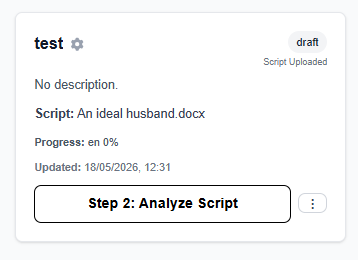
Use the two controls at the bottom
A project card has two separate controls:
- The wide button is the primary action. It takes you to the next workflow step for that project.
- The vertical-dots button opens
quick actions.
What is inside quick actions
Re-upload scriptfor step 1Analyze scriptfor step 2Editor & Simulationfor step 3Post-show reportsUpload preset to projectif your role allows itArchive ProjectDelete ProjectSurtitle Deployment Settings
Archive and delete carefully
- Archive Project keeps the project data but moves it out of the main active list.
- Delete is permanent.
- Archived projects still count toward archive-related limits. If you hit a limit, the UI tells you what to remove or which page to open next.
Plan Viewer links and printed QR codes
Pro and Pro+ can reserve a fixed Viewer URL and QR code before deployment, at project creation, in gear settings or on Go Live. Free and Lite normally receive a random URL only when deploying. Extension and Update Live keep the current address; verify it again before printing for a new deployment. See Viewer link and QR preparation for details.
FAQ
Common questions for this workflow, based on the current Pockitle Cue system.
Will archiving delete my project data?+
No. Archiving hides the project from active work but keeps its data so it can be unarchived later if your limits allow it.
Can Free accounts archive projects?+
Free includes 10 archived-project slots. Archive projects you are not actively using; delete a project only when you intend to remove it.
Onboarding Workflow
Continue In This Workflow
Account setup, sign-in recovery, first project steps, and invitation acceptance for new users.
1.2 Uploading a Script
Upload a DOCX theatre script to Pockitle Cue, check supported file, unit, and character limits, then prepare it for analysis and editable subtitle cues.
0.8 How to Accept a Team Invitation
Accept a team invitation link, handle email verification, and fix the most common account-mismatch blockers.
0.14 Security Alert Actions
Use sign-in alert links to confirm that a sign-in was yours or report it as suspicious.