
0.3 How to Reset Your Password in Pockitle Cue
Request a reset link, choose a new password, and recover from an expired link.
🔐 Quick Guide
Start here: Sign In → Forgot Password?
Steps: Open the reset email → set a new password → sign in
Reset your password
- On Sign In, choose Forgot Password?, enter your email address, and request a reset link
- Open the email and click the reset link
- Wait for the action page to validate the code
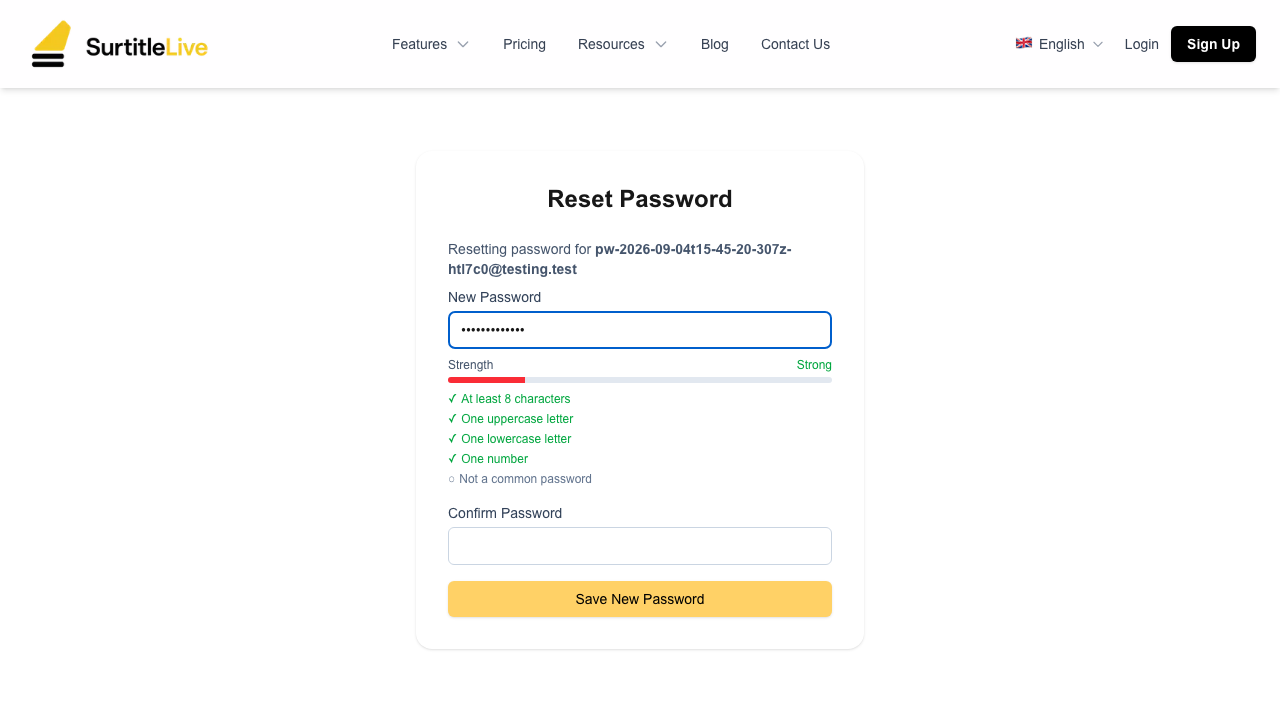
- Enter a new password that satisfies the strength requirements
- Submit the form, then sign in with the new password
Password Reset Requirements
The reset form checks the new password before it will submit:
- Minimum 8 characters
- Uppercase, lowercase, and number checks
- Common-password and weak-pattern screening
- New password and confirm password must match
If the Link Fails
- If the action page says the code is invalid or expired, request a fresh email instead of reusing the same link
- If the email link asks you to verify your email instead, use Forgot Password? on Sign In to request a password-reset email
- If a security or session message redirects you back to login, sign in again to start a clean session
FAQ
Common questions for this workflow, based on the current Pockitle Cue system.
How do I reset my password after I click the email link?+
The email link opens the email-action page, which checks the reset link first and then shows the new-password form if the link is still valid.
What if my reset link is invalid or expired?+
Request a new password-reset email from Sign In → Forgot Password? and use the newest link. A verification email confirms your address; it does not reset your password.
Onboarding Workflow
Continue In This Workflow
Account setup, sign-in recovery, first project steps, and invitation acceptance for new users.
0.4 First Login & Dashboard Overview
Get oriented with the dashboard, navigation, and mobile-device expectations.
0.5 Creating a New Project
Create a project, choose its status, and stay within active and archived project limits.
0.6 Managing Your Projects
Open, edit, archive, unarchive, or delete projects from the dashboard.